
macOS 27 Golden Gate Beta 1: Every New Feature, Compatible Macs & Release Date
Apple announced macOS 27 Golden Gate at WWDC 2026 on June 8, 2026. Building directly upon the visual identity of macOS 26 Tahoe, this version marks a historic shift by dropping support for Intel CPUs entirely, running exclusively on Apple silicon. The first developer beta (build 26A5353q) is currently available for testing, with the stable consumer launch planned for September 2026
Apple has officially released macOS 27 Golden Gate Developer Beta 1, and this update marks one of the most significant turning points in Mac history. It is the first version of macOS to run exclusively on Apple Silicon, it finally delivers the rebuilt Siri that was promised at WWDC 2024, and it refines virtually every corner of the operating system in ways Mac users have been asking for since the Liquid Glass redesign landed in macOS 26 Tahoe. Here is everything you need to know.
- What Is macOS 27 Golden Gate?
- macOS 27 Golden Gate Release Date
- Compatible Macs: Who Gets macOS 27 Golden Gate?
- Supported Macs
- Intel Macs That No Longer Qualify
- Apple Intelligence Requirements
- Rosetta 2: The End of an Era
- Every New Feature in macOS 27 Golden Gate Beta 1
- 1. Siri AI: A Ground-Up Rebuild for Mac
- 2. Refined Liquid Glass Design
- 3. Liquid Glass Transparency Slider
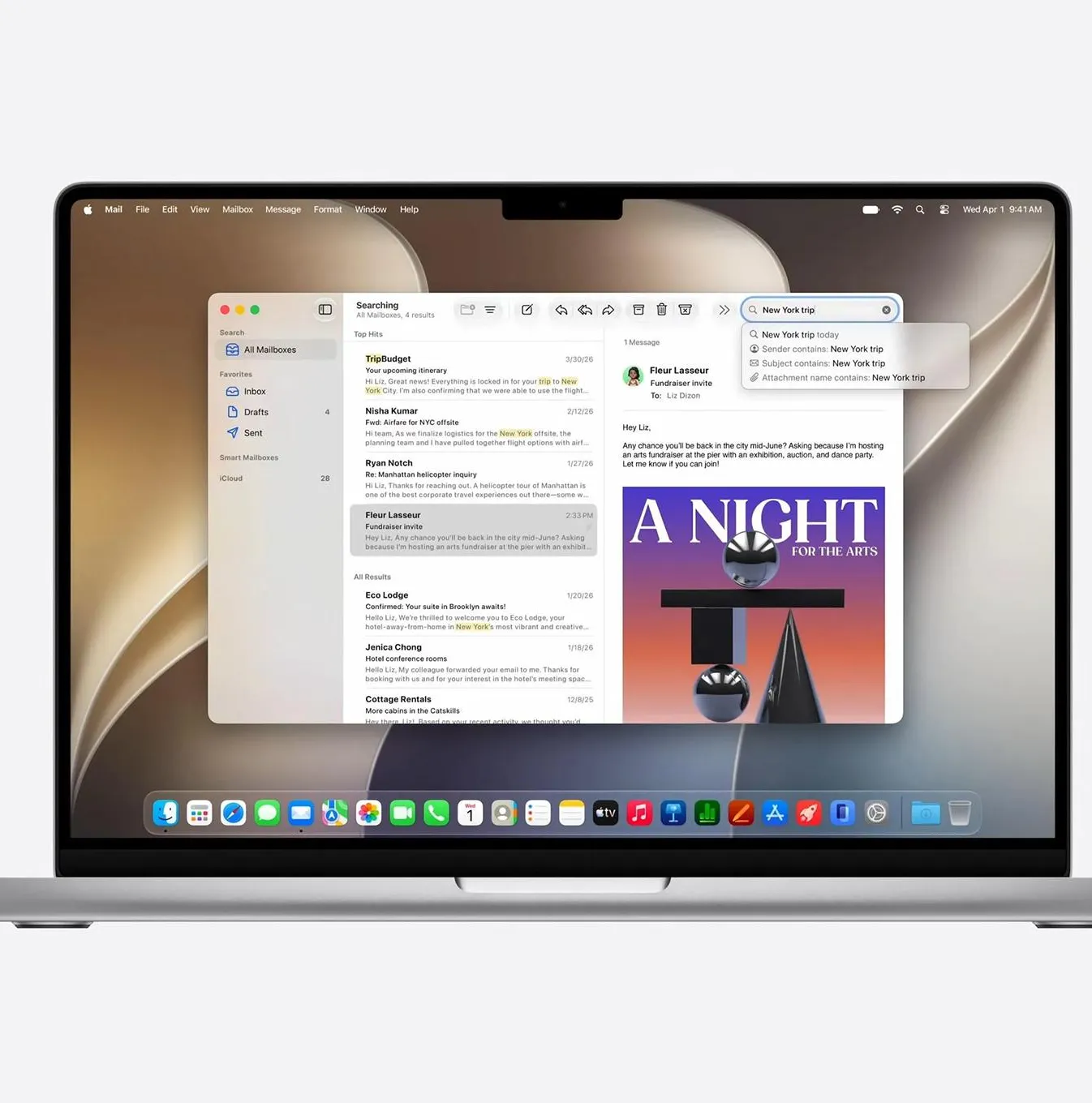
- 4. Spotlight Search: Fully Rebuilt
- 5. Safari: Smarter Tabs and Webpage Monitoring
- 6. Visual Intelligence Comes to Mac
- 7. Photos: Extend and Reframe
- 8. Parental Controls and Family Safety
- 9. Natural Language Shortcuts
- 10. Accessibility: Generated Subtitles and Accessibility Reader
- 11. AirPods Menu and Audio
- 12. App Updates: Weather, Freeform, Podcasts, Maps
- 13. Menu Bar and Connectivity Updates
- 14. Background Activity Transparency
- 15. Performance Improvements
- Apple Intelligence on Mac: Full Tier Breakdown
- What macOS 27 Drops Alongside Intel Support
- How to Install macOS 27 Golden Gate Developer Beta 1
- macOS 27 Golden Gate Beta 1: Final Verdict
What Is macOS 27 Golden Gate?
macOS 27 Golden Gate is Apple's next major operating system for Mac, announced at WWDC 2026 on June 8, 2026. The name follows Apple's tradition of California landmarks, taking its title from the iconic strait connecting San Francisco Bay to the Pacific Ocean.
Apple has positioned Golden Gate as a refinement-focused release, similar in spirit to Mac OS X Snow Leopard in 2009. The goal is not a ground-up visual overhaul but a disciplined polish of macOS 26 Tahoe: sharper performance, a more readable Liquid Glass interface, a rebuilt Siri AI, and expanded family safety tools. Apps now have a unified toolbar at the top, and the sidebar expands to the edge of the window.
macOS 27 Golden Gate Release Date
| Milestone | Date |
|---|---|
| Developer Beta 1 | Available now, June 8, 2026 |
| Public Beta | Expected July 2026 |
| Official Public Release | Fall 2026, most likely September or October |
macOS 27 Golden Gate is a free upgrade for all compatible Macs.
Should you install Beta 1? Developer betas are early, unstable software. Beta 1 carries real risks for production machines. Minor bugs have already been reported in iPhone Mirroring and initial background indexing. Wait for the public beta in July, or the final release, before updating any Mac you rely on for daily work.
Compatible Macs: Who Gets macOS 27 Golden Gate?
This is the headline compatibility story of macOS 27. macOS Golden Gate is the first version of macOS to run exclusively on Macs with Apple Silicon and is the last version with full Rosetta 2 functionality.
macOS 27 Golden Gate has dropped support for Intel-based Macs altogether. All supported Mac models are powered by Apple Silicon chips.
Supported Macs
| Mac Model | Minimum Generation |
|---|---|
| MacBook Neo | 2026 (A18 Pro) |
| MacBook Air | 2020 (M1) and later |
| MacBook Pro | 2020 (M1) and later |
| iMac | 2021 (M1) and later |
| Mac mini | 2020 (M1) and later |
| Mac Studio | 2022 (M1 Max / M1 Ultra) and later |
| Mac Pro | 2023 (M2 Ultra) and later |
Intel Macs That No Longer Qualify
Golden Gate drops support for all Macs with an Intel CPU, including the Mac Pro (2019), the MacBook Pro (16-inch, 2019), the MacBook Pro (13-inch, 2020, four Thunderbolt 3 ports), and the iMac (2020).
If your Mac is on this list, macOS 26 Tahoe will be your final major update. Apple is expected to continue delivering security patches for Intel Macs through approximately 2029, but new features and AI capabilities will belong exclusively to Apple Silicon going forward.
Apple Intelligence Requirements
Apple Intelligence on macOS 27 is available on MacBook Neo with A18 Pro and Mac models with M1 and later. Some of the most advanced on-device Apple Intelligence features require a Mac with M3 and later and at least 12GB of unified memory.
Rosetta 2: The End of an Era
macOS 27 Golden Gate is the final version of macOS to feature full Rosetta 2 support, meaning the translation layer that keeps Intel-built apps running on Apple Silicon Macs is set to disappear entirely with next year's major macOS release.
If you still depend on any Intel-only applications, Golden Gate is your last window to run them natively in macOS before Rosetta 2 support is phased out. Boot Camp has also been removed, as Golden Gate does not support Intel CPUs. Developers relying on Intel-compiled tools should treat this cycle as their final deadline to ship Apple Silicon-native builds.
Every New Feature in macOS 27 Golden Gate Beta 1
1. Siri AI: A Ground-Up Rebuild for Mac
Siri AI is the most substantial change in macOS 27, and the way it works on Mac is distinctly different from how it behaves on iPhone. Rather than a floating overlay, on the Mac you reach it through Spotlight: type a request into Spotlight, and it hands the request to the Siri AI chatbot. This replaces the old "Type to Siri" feature. Siri AI holds a back-and-forth conversation, so you can ask follow-up questions.
Key Siri AI capabilities on Mac:
- Personal context awareness: Siri can search across your Mail, Messages, Photos, Notes, and Calendar to surface specific information using natural, vague descriptions
- World Knowledge: A new mode lets Siri pull current information directly from the web to answer questions beyond your personal data
- Onscreen Visual Intelligence: Siri can now see and analyse content displayed on your screen, making it possible to ask questions about documents, images, and text in any app
- Writing Tools integration: Siri AI can generate new text from scratch, rewrite existing drafts, summarise long documents, and adapt its tone and word choice to match how you write to different recipients
- Cross-device conversation sync: Conversations with Siri on Mac sync privately to iPhone and iPad via iCloud, so context carries across devices
- Dedicated Siri App: A standalone app stores your query history, allowing you to revisit and manage previous interactions
Siri AI is powered in part by Google Gemini, while Apple keeps its own models for features such as Writing Tools. The new Siri AI launches in English first. It is not available in the European Union on launch due to Digital Markets Act (DMA) compliance. A waitlist is required to access it in Beta 1.
2. Refined Liquid Glass Design
macOS 26 Tahoe introduced Liquid Glass to the Mac and the reaction was mixed. Many users found readability suffered in key areas, and the transparent effects created visual clutter in sidebars and toolbars. Golden Gate addresses this directly.
Updates to Liquid Glass ensure exceptional readability with more uniform refraction and improved contrast. Uniform toolbars, edge-to-edge sidebars, and updated window shapes and menu bar icons deliver a more refined design.
The most tangible addition is a Liquid Glass Intensity Slider in System Settings, letting users adjust transparency from fully translucent to a tinted, more opaque look. Apps including Apple Music and the App Store have been updated with new sidebar-centric layouts and standardised corner radii across windows. Menu bar icons have been updated throughout for greater consistency.
3. Liquid Glass Transparency Slider
Users who prefer a more translucent experience can enjoy Liquid Glass at its maximum, while those who have a hard time reading through the Liquid Glass can choose a more tinted experience.
The slider is accessible in System Settings and applies system-wide in real time, giving users precise control over the effect rather than the binary toggle that existed in macOS 26.
4. Spotlight Search: Fully Rebuilt
Searching on the Mac has become less reliable, finding relevant results in Mail has been a struggle, and sometimes finding a file you just saved can take a while. Golden Gate targets all of this.
A new ranking system brings the most relevant results to the top to help you find what you need right away, even if it's buried deep in your inbox. Spotlight is also now the primary gateway to Siri AI. Typing a natural language question into Spotlight automatically triggers the Siri AI chat interface, collapsing two separate interaction modes into one unified action.
5. Safari: Smarter Tabs and Webpage Monitoring
Safari in macOS 27 gains several intelligence-driven features:
- Automatic Tab Topics: Safari groups open tabs by subject automatically and keeps those groups updated as you browse, making it significantly easier to manage sessions with dozens of tabs across different projects
- Notify Me (Webpage Change Alerts): Subscribe to any webpage and receive a notification when its content changes. This is particularly useful for monitoring product restocks, price drops, news updates, or event announcements
- Automatic Password Replacement: Safari can now detect compromised passwords and replace them automatically, working alongside the Passwords app to keep credentials secure without manual intervention
- Faster Start Page Loading: Safari's start page content loads noticeably quicker as part of the broader performance pass across the system
6. Visual Intelligence Comes to Mac
Visual Intelligence arrives on Mac with a dedicated keyboard shortcut. Press it, select any region on screen, and Siri AI analyses it: a photo, a PDF table, a business card, a product in an image.
This brings a capability that has been iPhone-exclusive since iPhone 16 to the desktop, where its applications are arguably even broader. Selecting a block of text in a PDF, an image in a document, or a table in a spreadsheet and immediately being able to ask Siri about it is a significant productivity gain for research, writing, and data work.
7. Photos: Extend and Reframe
The Photos app on Mac receives two AI-powered editing tools:
- Extend: Uses generative AI to expand an image beyond its original borders, filling in realistic background content around the edges of a photo
- Reframe (Spatial Reframing): Adjusts the perspective and composition of a photo after it was taken, effectively correcting the framing without reshooting
These tools join the existing Clean Up feature, which continues to improve with each beta in terms of the size and complexity of objects it can remove convincingly.
8. Parental Controls and Family Safety
Parental controls are being expanded significantly, including website approvals, contact approvals, and enhanced Communication Safety.
Specific additions include:
- A redesigned Screen Time interface with Time Allowances broken down by category, including Games, Social Media, and Entertainment
- Age-appropriate schedule recommendations developed alongside clinical child development specialists
- Ask to Browse, which requires children to request approval before visiting any new website in Safari
- Ask to Buy, requiring parental sign-off on any app download or in-app purchase
- Enhanced Communication Safety, which now blocks gore and violent content in shared images and videos in addition to its existing nudity detection
At a glance, parents can check how their kids have been using their Mac, and parents can quickly adjust access in the moment with just a click.
9. Natural Language Shortcuts
System automation is simplified through Shortcuts, where users can build complex, multi-app macros simply by typing a description of the workflow they want to achieve. There is no longer any need to drag action blocks or understand Shortcuts' internal logic to build a functional automation. Type what you want to happen, and the system builds it.
10. Accessibility: Generated Subtitles and Accessibility Reader
Generated subtitles transcribe spoken audio in any uncaptioned video, on device. Accessibility Reader handles complex documents and adds summaries and translation. Both features run entirely on-device, keeping personal audio and document content private.
Additional accessibility updates include:
- A global option to reduce transparency across all system UI, mirroring controls already available in iOS
- Improved hearing aid pairing reliability for Made for iPhone models across Apple devices
- Enhanced high-resolution ultrawide display support, with better compatibility for high-refresh-rate output
11. AirPods Menu and Audio
The AirPods menu in macOS 27 has been reorganised for easier access to routing options, hearing health data, firmware update notifications, and the new Equalizer. Users can now fine-tune bass, mids, and treble directly from the system-level AirPods menu without needing a third-party app.
12. App Updates: Weather, Freeform, Podcasts, Maps
- Weather: Redesigned with more detailed data visualisation for precipitation patterns, wind speed, and hourly forecasts. The new Highlights view surfaces the most important weather information for each day
- Freeform: Gains a system-wide dark mode and new drawing tools for whiteboard collaboration, making it more practical as a professional brainstorming and design tool
- Podcasts: Users can now switch seamlessly between video and audio playback modes without losing their place in an episode
- Maps: Updated with improved building detail accuracy and crisper Flyover visuals in major cities
13. Menu Bar and Connectivity Updates
MacBook users benefit from two long-requested menu bar improvements. Excess menu bar items can now be hidden more intuitively, reducing the clutter that builds up when multiple applications add their own icons. There is also a dedicated Ethernet status icon in the menu bar, giving users a clear, persistent indicator of wired network connectivity rather than requiring a trip to System Settings to verify connection status.
14. Background Activity Transparency
macOS 27 provides more detailed and timely notifications when apps perform background tasks. Rather than discovering unexplained battery drain or fan activity after the fact, users now receive clearer system indicators when a process is actively running in the background, along with information about which app is responsible.
15. Performance Improvements
With quicker AirDrop transfers, faster network file browsing, and speedier start page content loading in Safari, your Mac feels more responsive than ever.
Performance improvements in Golden Gate apply across the full supported device range, including the original M1 MacBook Air from 2020. Key gains include faster file system navigation, more responsive Spotlight indexing after startup, and reduced latency in window switching and multitasking. Minor slowdowns during the initial background indexing pass after installation are normal and resolve once the process completes.
Apple Intelligence on Mac: Full Tier Breakdown
| Feature Tier | Minimum Requirement |
|---|---|
| All core macOS 27 features | Any Apple Silicon Mac (M1 or later) |
| Apple Intelligence (basic) | M1 or later, or MacBook Neo (A18 Pro) |
| Advanced on-device AI | M3 or later with at least 12GB unified memory |
| Siri AI (via waitlist, English only) | M1 or later |
| On-device Siri AI | M3 or later with 12GB RAM |
What macOS 27 Drops Alongside Intel Support
Beyond dropping Intel Macs entirely, Golden Gate removes several legacy technologies:
- Boot Camp has been fully removed, as it required Intel CPU support
- AFP (Apple Filing Protocol) support has ended, along with Time Machine backups to AirPort Time Capsule routers
- Menu bar icons on menu items are no longer used, as part of the broader interface refinement
How to Install macOS 27 Golden Gate Developer Beta 1
- Enrol your Apple ID in the Apple Developer Program at developer.apple.com
- On your Mac, open System Settings, then go to General, then Software Update
- Click Beta Updates and select macOS 27 Developer Beta
- Download and install. Back up your Mac with Time Machine first
For a safer experience, the public beta arrives in July 2026 and requires only a free Apple ID. Most users should wait for the public beta or the full fall release before updating a machine they use for daily work.
macOS 27 Golden Gate Beta 1: Final Verdict
Golden Gate is the macOS update that completes a journey Apple started in 2020 when it shipped the first M1 Mac. Intel is gone. Rosetta 2 is on its way out. And the operating system that remains is faster, more readable, and far more intelligent than any previous version.
The Liquid Glass refinements, the search improvements, the Siri rebuild -- these are all fairly unflashy tweaks that will, if delivered as promised, be genuine user experience improvements.
The public beta in July will be the right moment for most Mac users to experience these changes safely. The full release in fall 2026 promises to be the strongest macOS update since the original Apple Silicon transition.
Published by iOSBUDDY.COM | Last updated: June 2026
Tags: macOS 27, macOS 27 Golden Gate, macOS 27 Beta 1, macOS 27 features, macOS 27 compatible Macs, macOS 27 release date, Siri AI Mac, Apple Silicon only, Liquid Glass slider, WWDC 2026, macOS Golden Gate Beta
You Might Also Like

Jun 24, 2026
iOS 27 Developer Beta 2: Every New Feature, Fix, and Change You Need to Know
Apple released iOS 27 Developer Beta 2 (build 24A5370h) on June 22, 2026. Following the initial debut of iOS 27 at WWDC, this second beta focuses heavily on refining system stability, smoothing out the brand-new "Liquid Glass" interface, and accelerating Siri AI performance
Read more →
Jul 23, 2026
iOS 27 and iPadOS 27 Public Beta 2 Now Available: Everything You Need to Know
Apple has released the second public betas of iOS 27 and iPadOS 27 — here is a complete breakdown of every new feature, what has changed since Public Beta 1, how to install it today, and what to expect before the September launch.
Read more →
Jun 27, 2026
ASR (Apple Software Restore)
ASR (Apple Software Restore) is Apple’s native command-line utility used to efficiently copy disk images to a target volume, clone drives, and restore system snapshots. It is the powerful, invisible backend engine that drives the graphical "Restore" feature in macOS's Disk Utility.
Read more →
Comments
No comments yet. Be the first to comment!
Leave a Comment
Sign in to comment
Join the conversation with your account or continue as a guest.