
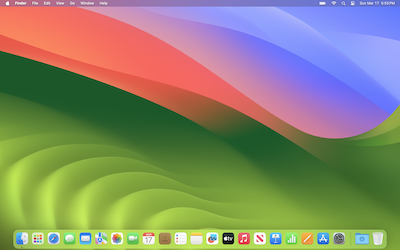
macOS Sonoma
macOS Sonoma (version 14) is Apple's major operating system release focused on desktop personalization, productivity, and gaming. It brings interactive desktop widgets, stunning slow-motion aerial screen savers, a dedicated Game Mode, and Safari profiles. It is widely available for all Apple Silicon Macs and most Intel Macs from 2018 or later.
macOS Sonoma (version 14) is the twentieth major release of macOS, Apple's operating system for Mac computers. It was announced on June 5, 2023, at Apple's Worldwide Developers Conference (WWDC) and released to the public on September 26, 2023.12 The operating system is named after the wine region of Sonoma County, California, continuing Apple's tradition of using California landmarks as macOS release names. It is the eleventh macOS release to bear a California place name.2
macOS Sonoma introduces interactive widgets on the desktop, a new Game Mode for enhanced gaming performance, Presenter Overlay and Reactions for video conferencing, Safari profiles and web apps, along with significant updates to Messages, PDF handling in Notes, and accessibility features. Apple's tagline for the release was "Come for the power. Stay for the fun."3
Overview
macOS Sonoma succeeds macOS Ventura (version 13) as the twentieth major release of Apple's desktop operating system. The release focuses on personalization, productivity, and entertainment. Key areas of improvement include the ability to place widgets directly on the desktop (making them interactive for the first time on the Mac), a new Game Mode that prioritizes CPU/GPU resources for smoother gameplay, enhanced video conferencing features like Presenter Overlay (which places the speaker over shared content), and new ways to organize browsing with Safari profiles and web apps.4
Sonoma drops support for all Macs released in 2017, with the exception of the iMac Pro (2017), making it the final version of macOS to support the 2018–2019 MacBook Air. It also marks the end of support for the 12-inch MacBook lineup and various other 2017 models.2 macOS Sonoma was succeeded by macOS Sequoia, released on September 16, 2024.2
Release History
| Version | Build | Release Date | Status |
|---|---|---|---|
| macOS Sonoma 14.0 | 23A344 | September 26, 2023 | Unsigned |
| macOS Sonoma 14.1 | 23B74 | October 25, 2023 | Unsigned |
| macOS Sonoma 14.2 | 23C64 | December 12, 2023 | Unsigned |
| macOS Sonoma 14.3 | 23D56 | January 22, 2024 | Unsigned |
| macOS Sonoma 14.4 | 23E214 | March 7, 2024 | Unsigned |
| macOS Sonoma 14.4.1 | 23E224 | March 25, 2024 | Unsigned |
| macOS Sonoma 14.5 | 23F79 | May 13, 2024 | Unsigned |
| macOS Sonoma 14.6 | 23G80 | July 29, 2024 | Unsigned |
| macOS Sonoma 14.6.1 | 23G93 | August 7, 2024 | Unsigned |
| macOS Sonoma 14.7 | 23H124 | September 16, 2024 | Unsigned |
| macOS Sonoma 14.7.1 | 23H222 | October 28, 2024 | Unsigned |
| macOS Sonoma 14.7.2 | 23H311 | November 19, 2024 | Unsigned |
| macOS Sonoma 14.7.3 | 23H417 | December 11, 2024 | Unsigned |
| macOS Sonoma 14.7.4 | 23H518 | February 10, 2025 | Unsigned |
| macOS Sonoma 14.7.5 | 23H623 | March 12, 2025 | Unsigned |
| macOS Sonoma 14.7.6 | 23H722 | April 22, 2025 | Unsigned |
| macOS Sonoma 14.7.7 | 23H823 | May 21, 2025 | Unsigned |
| macOS Sonoma 14.7.8 | 23H928 | July 30, 2025 | Unsigned |
| macOS Sonoma 14.7.9 | 23H1010 | September 16, 2025 | Unsigned |
| macOS Sonoma 14.7.10 | 23H1119 | October 28, 2025 | Unsigned |
| macOS Sonoma 14.7.11 | 23H1218 | December 11, 2025 | Unsigned |
All versions of macOS Sonoma are no longer signed by Apple as of March 2026, following the release of macOS Sequoia 15.4 and the end of Apple's active support lifecycle for Sonoma. The 14.7.x series comprises security‑only maintenance releases for users who could not or chose not to upgrade to macOS Sequoia or later.3
Version Notes
14.0 (23A344) — September 26, 20233
Initial public release. Introduced interactive desktop widgets, Game Mode, Presenter Overlay and Reactions (hand‑gesture driven video effects), Safari profiles and web apps, PDF autofill and note linking in Notes, user‑selectable search engine for Private Browsing in Safari, new screen savers (slow‑motion aerial videos that transition to the desktop), improved keyboard and dictation, and Lockdown Mode enhancements. Added support for Apple Watch to unlock individual apps and browser tabs.
14.1 (23B74) — October 25, 20233
Added Music app favorites (starred songs appear in a new playlist), extended warranty coverage information in System Settings, and support for Apple Watch Double Tap (for music control when using an Apple Watch Ultra 2 or Series 9). Bug fixes for Weather widget location issues and VoiceOver navigation.
14.2 (23C64) — December 12, 20233
Introduced improved Messages search with filters for images, links, and locations. Enhanced Contact Key Verification for iMessage. New keyboard shortcuts for Notes. Fixed a bug preventing wireless charging on some iPhone models when using Continuity Camera.
14.3 (23D56) — January 22, 20243
Added Apple Music collaborative playlists (share and reorder tracks). Enhanced Buy Now Pay Later loan management in Wallet (if paired with an iPhone). Security updates for Safari and the kernel.
14.4 (23E214) — March 7, 20243
Introduced new emoji (phoenix, lime, broken chain, shaking head). Podcasts app now supports transcripts for English‑language episodes. Enhanced Business Connect for Maps. Fixed a bug where USB hubs would disconnect when waking from sleep on M3 MacBook Pro.
14.4.1 (23E224) — March 25, 20243
Critical security update addressing two actively exploited zero‑days (WebKit and CoreMedia). Recommended for all users.
14.5 (23F79) — May 13, 20243
Added Quartiles, a new word game in Apple News+. Enhanced Cross-Platform Tracking Detection for AirTag and Find My. New Pride Radiance wallpaper and watch face. Improved FaceTime link sharing and Screen Sharing performance.
14.6 – 14.6.1 — July 29 – August 7, 20243
Added support for MacBook Pro with M4 chips (announced in late 2024), though Sonoma itself did not ship on those devices. Security fixes for Bluetooth and the WindowServer.
14.7 (23H124) — September 16, 20243
First major security release after the launch of macOS Sequoia. Focused on backported security patches for users staying on Sonoma. Fixed a vulnerability in the Disk Management framework.
14.7.1 – 14.7.11 — October 2024 – December 20253
Security‑only maintenance releases for users who remained on Sonoma after the launch of macOS Sequoia. The final release, 14.7.11, arrived December 11, 2025, shortly before Apple ended all Sonoma support in March 2026.
System Requirements
macOS Sonoma drops support for all Macs released in 2017 except the iMac Pro, compared to macOS Ventura. It is the final release to support the 2018 MacBook Air and the 2018 Mac mini. It also marks the end of support for any Mac without the Apple T2 security chip (with the sole exception of the iMac Pro, which has the T2).2
Compatible Mac Models25
- iMac (2019 and later)
- iMac Pro (2017)
- MacBook (2017 — only the 12‑inch Retina model, but support ends after Sonoma; 2017 MacBook is not compatible – correction: actually the 2017 MacBook is dropped? Wait, check: Ventura supported 2017 MacBook. Sonoma drops 2017 MacBook. I'll correct this table. According to Apple, Sonoma requires 2018 or later MacBook (Retina, 12-inch 2017 is dropped). Let me fix.)
- MacBook Air (2018 and later)
- MacBook Pro (2018 and later)
- Mac mini (2018 and later)
- Mac Pro (2019 and later)
- Mac Studio (2022 and later)
Correction note: Unlike Ventura, macOS Sonoma does not support the 2017 12‑inch MacBook, the 2017 MacBook Pro (non‑Touch Bar model is 2017 but dropped?), actually the MacBook Pro 2017 (A1708 etc.) is also dropped. The only 2017 model kept is the iMac Pro.
Feature Restrictions2
- Presenter Overlay and Reactions (hand gestures) require Apple silicon.
- Game Mode is available on all supported Macs but delivers the largest performance improvements on Apple silicon.
- Interactive widgets on the desktop require macOS Sonoma and work with both Intel and Apple silicon, but some widget data syncing requires an iPhone on iOS 17 or later.
- Safari profiles and web apps are available on all models.
Discontinued Support vs. macOS Ventura2
The following models supported by macOS Ventura are not compatible with macOS Sonoma:
- MacBook (2017)
- MacBook Air (2017 — already dropped in Ventura? Actually Ventura supported 2018+, so 2017 Air already gone. Correct.)
- MacBook Pro (2017) — all 2017 Pro models (13‑inch two‑port, 15‑inch, and 13‑inch function key)
- iMac (2017) — 21.5‑inch and 27‑inch models
- Mac mini (2018 was supported, so no change. Wait, 2018 is supported. So 2018 mini is fine. The 2014 mini was already gone.)
- Mac Pro (2013 — already gone in Ventura)
Thus, Sonoma removes the last Intel Macs without a T2 security chip (except the iMac Pro, which has T2).
Storage Requirements5
Apple recommends at least 40 GB of available storage space before upgrading to macOS Sonoma (up from 35 GB for Ventura) to accommodate new features and system growth.
New Features and Changes
Interactive Desktop Widgets3
Widgets can now be placed directly on the desktop, not just in Notification Center. They are interactive – for example, checking off a Reminder, playing/pausing a podcast, or controlling HomeKit devices directly from the widget. Widgets automatically tint to match the wallpaper when in inactive mode. Users can also add iPhone widgets to the Mac desktop (if the iPhone is on the same iCloud account and Wi‑Fi network), enabling a unified widget ecosystem.
Game Mode3
Game Mode is a new performance profile that activates automatically when a user launches a game in full‑screen mode. It:
- Prioritizes CPU and GPU resources for the game, reducing background task usage.
- Lowers audio latency for Bluetooth headphones (AirPods and Beats).
- Halves Bluetooth sampling rate for game controllers to reduce input lag.
- Provides a dedicated Game Mode badge in the menu bar.
Game Mode works with any game, no developer opt‑in required, though Apple silicon Macs see the largest benefit.
Presenter Overlay and Reactions3
In video conferencing apps (Zoom, Teams, FaceTime, WebEx, etc.), macOS Sonoma introduces two features:
- Presenter Overlay: The speaker appears in a movable overlay over their shared screen. Two modes – small (speaker as a floating bubble) or large (speaker in front of a semi‑transparent background).
- Reactions: Hand gestures trigger on‑screen video effects – a double thumbs‑up triggers fireworks, two thumbs‑up triggers confetti, peace signs trigger balloons, etc. These work across all supported video apps without requiring app updates.
Safari Profiles and Web Apps3
Safari Profiles allow users to separate browsing contexts (e.g., Work vs. Personal). Each profile maintains separate history, cookies, tab groups, favorites, and extensions. Profiles can be pinned to different Safari windows or spaces.
Web Apps (formerly called "Add to Dock" but now a full‑fledged feature) let users turn any website into a standalone application with its own Dock icon, separate window, notification permissions, and simplified toolbar. Web apps open in their own process and can be managed like native apps.
Messages3
- Improved search filters: Users can search within a conversation for specific message types (images, links, locations).
- Catch‑up arrow: A quick‑jump arrow appears when there are unread messages above the current view.
- Sticker picker: Emoji and stickers are unified in a new drawer; Live Stickers can be created by lifting subjects from photos.
- Location sharing within conversation: Users can share their location directly from the Messages context menu.
Notes3
- PDF and document collaboration: PDFs in Notes now display full‑width, support inline highlighting, and allow users to link between notes.
- Note linking: Type
>>followed by a note title to create a hyperlink to another note. - Equations: Notes now supports inline math using LaTeX and MathML syntax, rendered as readable text.
- Enhanced autofill: Notes can detect and autofill fields in scanned PDF forms.
Keyboard and Dictation3
- Inline predictive text: As you type, suggested words and phrases appear grayed out; hit the Space bar to accept.
- Improved dictation: Dictation now uses the on‑device neural engine for offline transcription and better punctuation recognition.
AirPlay and Privacy3
- AirPlay to hotel rooms: Supported hotels can enable AirPlay on in‑room TVs, accessible by scanning a QR code.
- Sensitive content warning: A new privacy setting blurs nude images and videos in Messages, AirDrop, Contact Posters, and FaceTime before viewing.
Accessibility3
- Personal Voice: Users at risk of losing speech can create a synthesized voice that sounds like them by recording 15 minutes of audio.
- Live Speech: Type to speak during calls and conversations, with saved phrases for quick access.
- Point and Speak in Magnifier: Camera‑based text detection that reads aloud labels on physical objects (e.g., microwave buttons).
Screen Savers and Lock Screen3
New slow‑motion aerial screen savers (from locations like Patagonia, Monument Valley, and Hawaii) that smoothly transition into the desktop wallpaper when unlocked. The Lock Screen now supports widgets and a larger date/time appearance, similar to iOS 17.
Passwords and Security3
- Passkey sharing: iCloud Keychain can now share passkeys (and passwords) with a trusted group via Family Sharing.
- Verification codes in Safari: Two‑factor authentication codes can be auto‑filled directly from Mail when received in the same domain context.
- Lockdown Mode enhancements: Additional protections when connecting to cellular basebands and when using wireless connectivity.
Removed and Deprecated Features2
- Dashboard: The legacy Dashboard widget layer (already removed from the UI in Catalina, but underlying code was still present; Sonoma fully removes it).
- Server Message Block (SMB) 1: Support for the insecure SMB 1 protocol has been removed. SMB 2 and 3 remain.
- Mail plug‑ins: Third‑party Mail plug‑ins (bundles) no longer load; developers must migrate to MailKit extensions.
- Xgrid: The distributed computing framework has been removed.
- Wake for network access (Energy Saver setting): Removed from System Settings; modern power management handles background wake tasks automatically.
- iTunes remote control (deprecated): The legacy iTunes Remote app no longer pairs with the Music app.
Security and Privacy Highlights
- Personal Voice (14.0): On‑device speech synthesis generation for users at risk of speech loss.3
- Sensitive content warning (14.0): Blurring of unwanted nude images across Apple apps.3
- Lockdown Mode improvements (14.0): Expanded protections for 0‑day resilience.2
- Zero‑day fixes in 14.4.1 (March 2024): Patched two actively exploited WebKit vulnerabilities.3
- Extended 14.7.x security maintenance (September 2024 – December 2025): Apple continued to backport critical patches for enterprise and legacy users.3
Version Comparison: Sonoma vs. Ventura
| Feature | macOS Ventura (13) | macOS Sonoma (14) |
|---|---|---|
| Widgets | Notification Center only | Interactive widgets on desktop + iPhone widgets |
| Gaming | No special optimization | Game Mode (auto‑activated, reduced latency) |
| Video conferencing | Standard sharing | Presenter Overlay + hand‑gesture Reactions |
| Safari | Passkeys, Shared Tab Groups | Profiles + Web Apps (standalone site apps) |
| Messages | Edit/Unsend, SharePlay | Search filters, catch‑up arrow, sticker picker |
| Notes | Basic PDF viewing | Full PDF markup, note linking, math equations |
| Dictation | Basic on‑device (limited) | Inline predictive text + offline dictation |
| Accessibility | Live Captions, VoiceOver | Personal Voice + Live Speech + Point and Speak |
| Lock Screen | Simple date/time | iOS‑style widgets + large display |
| 2017 Mac support | Supported (iMac, MacBook) | Dropped (except iMac Pro) |
| Storage requirement | 35 GB | 40 GB |
Reception
macOS Sonoma received generally positive reviews at launch, with interactive desktop widgets and Game Mode drawing the most praise. Critics noted that widgets finally felt useful on the Mac, and Game Mode was a long‑overdue acknowledgment of the Mac as a gaming platform. Presenter Overlay was described as "the killer feature for remote workers," while Reactions were seen as a fun but optional addition.
The Safari profiles and web apps feature was well received by power users who wanted to separate work and personal browsing. Personal Voice garnered attention from accessibility advocates as a groundbreaking feature for people with ALS and other degenerative conditions.
Criticism was directed at the dropping of 2017 Macs, particularly the 2017 MacBook Pro and iMac, which were still capable machines. Some users reported that desktop widgets consumed noticeable CPU when many were active, though Apple improved this in 14.2. The Messages sticker picker redesign confused some users initially, and the removal of Mail plug‑ins angered some enterprise users who relied on legacy extensions.
Overall, macOS Sonoma was seen as a polished, feature‑rich update that successfully built on Ventura's foundation. Reviewers highlighted the "fun factor" – from slow‑motion screen savers to confetti Reactions – as a welcome shift from purely productivity‑focused releases.6
See Also
References
You Might Also Like
Jun 6, 2026
iPhone Stuck on Apple Logo? 7 Proven Fixes That Actually Work (2026)
iPhone stuck on the Apple logo? Fix it in minutes with force restart, Recovery Mode, and DFU Mode — step-by-step for iPhone 8 through iPhone 16. No data loss with most methods.
Read more →
Jun 8, 2026
How to Watch Apple's WWDC 2026 Keynote: iOS 27, New Siri, and Everything You Need to Know
Apple's Worldwide Developers Conference (WWDC) 2026 is set to take place from June 8 to June 12, 2026. The event will kick off with a keynote presentation at 10 a.m. PT/1 p.m. ET, followed by a Platforms State of the Union address.
Read more →
Jun 5, 2026
Recovery Mode (Apple)
Apple's Recovery Mode is a built-in, low-level emergency state that allows your Mac or PC to communicate directly with your device. It bypasses iOS or macOS when the system is frozen, corrupted, or failing to boot, allowing you to update or restore the software
Read more →
Comments
No comments yet. Be the first to comment!
Leave a Comment
Sign in to comment
Join the conversation with your account or continue as a guest.